


Instant Digital Download

Lifetime Product Guarantee

Year Round Service

Microsoft Certified Partner
Office 2021 Professional Plus is Microsoft’s one-time-purchase Office suite for Windows, and this listing gives you a genuine retail key that activates it online on one PC. You get the full Professional Plus app set, including Access and Publisher, with no subscription to renew.
Before you order, there is one date worth knowing: Microsoft ends support for Office 2021 on October 13, 2026. The apps keep working after that date, but security updates stop. This page explains what that means, what the key includes, how activation works and when a newer version is the better buy.
Office 2021 Professional Plus: Quick Answer
Here is what this Office 2021 Professional Plus key covers:
- Edition: Office Professional Plus 2021 for Windows
- Devices: one Windows PC
- License type: perpetual, one-time purchase
- Activation: online, directly in any Office app
- Delivery: by email, usually instantly after payment
- Platform: Windows 10 and Windows 11 only (not macOS)
- Support status: security updates end on October 13, 2026
In short, the key suits a single Windows PC that needs the full desktop suite, as long as you are comfortable with the support timeline below.
Is Office 2021 Professional Plus Still Supported?
Yes, until October 13, 2026. After that date, Microsoft will no longer release security fixes, bug fixes or technical support for Office 2021, and Microsoft has said there is no paid Extended Security Updates program for it.
End of support does not switch the software off. Word, Excel and the other apps will open and save files as usual. The risk is gradual: unpatched vulnerabilities, and newer file features or add-ins that may stop being tested against Office 2021.
IMPORTANT: If you are buying Office for a new PC that you plan to use for several years, Office 2024 is supported until October 2029 and is usually the more sensible long-term choice. Microsoft’s official Office end-of-support resources page lists the current dates.
Office 2021 still makes sense when you need to match other PCs already on 2021, when a line-of-business add-in is certified for this version, or when the PC is offline or short-lived.
What Is Included in Office 2021 Professional Plus?
Professional Plus is the most complete Office 2021 suite for Windows. It includes these desktop apps:
| App | What you use it for |
|---|---|
| Word 2021 | Documents, reports, letters and long-form writing |
| Excel 2021 | Spreadsheets, budgets, data analysis and charts |
| PowerPoint 2021 | Presentations and recorded slide shows |
| Outlook 2021 | Email, calendar and contacts |
| OneNote | Digital notebooks and meeting notes |
| Access 2021 | Desktop databases and small business records |
| Publisher 2021 | Flyers, brochures and newsletters |
| Microsoft Teams | Chat, calls and meetings (requires a Microsoft account) |
Access and Publisher are the two apps that separate Professional Plus from cheaper editions such as Home & Business. If you never build databases or print layouts, a smaller edition may be enough.
A note on Publisher: Microsoft has announced that Publisher is being retired in October 2026. The Publisher 2021 app you install will keep working, but it is sensible to plan another tool for future layout work.
Key Features in Office 2021 Professional Plus
Office 2021 is not a reinvention of Office. It is a well-polished version of the tools most people already know, with a handful of genuinely useful additions.
Excel: XLOOKUP, Dynamic Arrays and LET
XLOOKUP replaces the older VLOOKUP and HLOOKUP with a single function that searches in any direction and returns exact matches by default. Dynamic arrays let one formula spill results into neighboring cells, and functions such as FILTER, SORT, UNIQUE and LET make complex sheets shorter and easier to audit.
If you still maintain spreadsheets full of nested VLOOKUPs, XLOOKUP alone can make them far less fragile.
Word: Line Focus and Visual Refresh
Word 2021 adds Line Focus in Immersive Reader, which highlights one, three or five lines at a time for easier reading. The interface has a cleaner look, and dark mode now covers the document canvas as well as the ribbon.
PowerPoint: Better Recording Tools
PowerPoint 2021 can record your slide show with presenter video, ink and laser pointer movements, which is handy for training material. Sketched style outlines give shapes a hand-drawn look when a slide needs to feel less formal.
Outlook: Built-In Translation and Faster Search
Outlook 2021 can translate messages into many languages without leaving your inbox, and search now sits at the top of the window. Microsoft states that Office 2021 also brings performance, stability and speed improvements across the core apps.
Co-Authoring and OpenDocument Support
When files are stored in OneDrive or SharePoint, several people can edit the same Word, Excel or PowerPoint file at once. Office 2021 also supports OpenDocument Format (ODF) 1.3, which helps when you exchange files with LibreOffice users.
Keep expectations realistic: Office 2021 does not include Microsoft 365 cloud features such as Copilot, and it does not receive new features after release. What you install is, apart from security fixes, what you keep.
Office 2021 Professional Plus System Requirements
Microsoft’s published minimum requirements are modest:
| Component | Minimum requirement |
|---|---|
| Operating system | Windows 11 or Windows 10 |
| Processor | 1.1 GHz or faster, 2 cores |
| Memory | 4 GB RAM (64-bit) |
| Storage | 4 GB free disk space |
| Display | 1280 x 768 resolution |
| Graphics | DirectX 9 or later, WDDM 2.0 or higher |
| Internet | Needed for download and activation |
These are minimum specifications, not a promise of ideal performance. For large Excel workbooks or many open windows, 8 GB of RAM and an SSD make daily work noticeably smoother. Office 2021 does not run on macOS; Mac users should look at Microsoft Office 2021 Home and Business for Mac instead.
How to Install and Activate Office 2021 Professional Plus
Activation takes a few minutes. Follow these steps:
- Uninstall any trial or older Office version, and restart the PC.
- Download the official installer using Microsoft’s Office 2021 download and install instructions, or the setup link included with your order email.
- Run the installer and wait for all apps to finish installing.
- Open Word or Excel, then go to File → Account → Change Product Key.
- Enter the 25-character key from your email and confirm.
- Check File → Account and confirm it shows “Product Activated”.
Only download Office from official Microsoft sources. Pre-activated installers from unofficial websites are a reliable way to swap a license problem for a security problem.
If online activation is not available on your network, see our guide on how to activate Microsoft Office by phone and use the Bcdkey Get Confirmation ID tool.
Which Office 2021 Key Is Right for You?
The Office 2021 category includes several licenses for the same suite. They differ in device count and activation method, not in the apps you get:
| Your situation | Recommended option |
|---|---|
| One Windows PC, standard online activation | Office 2021 Professional Plus (this product) |
| Up to five PCs with one key | Office 2021 Professional Plus 5PC |
| License tied to your Microsoft account for easy reinstall | Office 2021 Professional Plus Bind Key |
| Offline PC or restricted network | Office 2021 Pro Plus Phone Activation |
| Business standardizing on volume-licensed Office | Office 2021 Pro Plus LTSC |
| New PC you plan to keep for years | Office 2024 Professional Plus LTSC |
Who Should Choose Office 2021 Professional Plus?
Choose Office 2021 Professional Plus when you:
- Need Access or Publisher alongside Word, Excel and Outlook
- Prefer a one-time license over a subscription
- Want to match other PCs already running Office 2021
- Use a PC for a defined project or a short remaining lifespan
- Rely on an add-in or template certified for Office 2021
Consider another option when you:
- Want security updates beyond October 2026
- Use a Mac rather than a Windows PC
- Need Copilot or always-updated Microsoft 365 features
- Only need Word, Excel and PowerPoint for home use
For home users who only need the core apps, Microsoft Office 2024 Home is a simpler and longer-supported choice.
FAQ About Office 2021 Professional Plus
Is Office 2021 Professional Plus a one-time purchase?
Yes. It is a perpetual license, so you pay once and there is no monthly or yearly subscription to renew.
How many PCs can I activate with this key?
One. This key activates Office 2021 Professional Plus on a single Windows PC; for more devices, choose the 5PC version or buy additional keys.
Will Office 2021 stop working after October 13, 2026?
No. The apps keep working after end of support, but Microsoft no longer provides security updates, bug fixes or technical support.
Does Office 2021 Professional Plus work on a Mac?
No. Professional Plus is Windows-only; Mac users need Office 2021 or Office 2024 Home and Business for Mac.
Can I reinstall Office 2021 on the same PC?
Usually, yes. Reinstalling on the same PC normally reactivates with the same key; if it does not, phone activation or a Bcdkey support ticket can resolve it.
Where can I find my key after purchase?
Your key is sent by email and is also stored in My Account under your orders.
Office 2021 Professional Plus is not about getting the newest Office. It is about getting the complete desktop suite on one PC for a clear, known period.
If you need the full app set on one Windows PC and the October 13, 2026 support date fits your plans, this key does the job. If you want updates well beyond 2026, compare the Office 2024 range first. You can also browse all Office 2021 licenses and the wider Microsoft Office collection on Bcdkey.
| Brand | Microsoft |
|---|---|
| Operating System | Windows |
| Activation Limit | For 1 PC |
| Activation Type | Online |
| Delivery Type | Via Email |
| Delivery Time | Instant |
The product key is valid for 1 install only and it does NOT bind to your Microsoft account. If you require to reinstall or change your system please purchase Office 2021 Pro Plus Bind key.
1. Select the correct version you bought below and download the ISO file. The download process should start after clicking the link. Wait for the download to finish before mounting the file. Downloading can take 10-20 minutes depending on your internet speed.
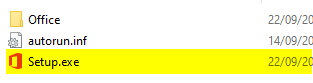
3. On the left side of this same window, you will see that an Office device appears under This Pc. To install, click on the new device/drive, and then on the right side of the window you will see the content. Finally, double-click on the Setup file. This will start the installation process.
- Processor: Windows 11 or Windows 10 with 1.6 GHz, 2-core processor
- Operating system: Windows 11 or Windows 10 for PC
- Memory: 4 GB (64bit), 2 GB (32bit) RAM for PC
- Hard disk space: 4 GB available disk space for PC
- Display: 1024 x 768 resolution for PC
- Graphics: DirectX 10 graphics card for graphics hardware acceleration for PC
- Additional system requirements: Internet access, Microsoft account


