Instant Digital Download

Lifetime Product Guarantee

Year Round Service

Microsoft Certified Partner
Office 2021 Pro Plus LTSC is the volume-licensed edition of Office Professional Plus 2021, built for organizations that want a fixed feature set without monthly changes. This listing provides a genuine key that activates Office LTSC Professional Plus 2021 online on one Windows PC.
LTSC stands for Long-Term Servicing Channel, meaning Microsoft ships security fixes but no new features for the life of the product. That stability is the whole point, and it is why many businesses and regulated environments prefer LTSC.
The most important fact first: Microsoft ends support for Office LTSC 2021 on October 13, 2026. This page explains what LTSC includes, how it differs from retail Office 2021, how to install it correctly, and when Office LTSC 2024 is the better purchase.
Office 2021 Pro Plus LTSC: Quick Answer
Here is what the Office 2021 Pro Plus LTSC key covers:
- Edition: Office LTSC Professional Plus 2021 (volume build) for Windows
- Devices: one Windows PC
- License type: perpetual, one-time purchase
- Activation: online with the product key
- Installation: Office Deployment Tool with the volume product ID
- Delivery: by email, usually instantly
- Support status: security updates end on October 13, 2026
In simple terms: Download ODT → Configure → Install → Enter Key → Activate → Verify.
What Is Office 2021 Pro Plus LTSC?
Office LTSC Professional Plus 2021 is Microsoft’s perpetual Office release for volume-licensed customers. It went on sale in September 2021, alongside the retail Office 2021 suites for home and small business buyers.
Unlike Microsoft 365 Apps, which receive new features every month, LTSC stays feature-frozen. What you install on day one is what your users see until retirement, apart from security and quality fixes.
That predictability suits environments where every change needs testing: manufacturing lines, labs, clinics, call centers and PCs that run validated add-ins or macros.
Is Office 2021 Pro Plus LTSC Still Supported?
Yes, until October 13, 2026. Office LTSC 2021 follows Microsoft’s Fixed Lifecycle Policy, a set support period announced at release, and that period ends on this date. Microsoft has said there will be no Extended Security Updates for Office LTSC 2021.
After end of support, the apps continue to run. What stops is the flow of security fixes, bug fixes and technical support. Microsoft’s official Office end-of-support resources page lists this date and related retirements.
IMPORTANT: Microsoft recommends Office LTSC 2024 for organizations that need a disconnected, perpetual Office, and it is supported until October 2029. For new deployments, Office 2024 Professional Plus LTSC is usually the more future-proof choice.
Office 2021 Pro Plus LTSC still makes sense when you must match an existing LTSC 2021 image, when an add-in vendor has only certified the 2021 build, or when PCs are due for replacement soon.
Office 2021 Pro Plus LTSC vs Retail Office 2021 Professional Plus
Both products carry the “Professional Plus 2021” name, which causes understandable confusion. They differ in licensing channel and a few apps:
| Area | Office 2021 Pro Plus LTSC | Retail Office 2021 Professional Plus |
|---|---|---|
| License channel | Volume licensing | Retail |
| Install product ID | ProPlus2021Volume |
ProPlus2021Retail |
| Update channel | PerpetualVL2021 |
Retail updates |
| Microsoft Teams | Not included by default | Included |
| Skype for Business | Included | Not included |
| Access and Publisher | Included | Included |
| Support end date | October 13, 2026 | October 13, 2026 |
The key must match the build you install. A volume key entered into a retail installation, or the reverse, is a common reason for “this key isn’t valid” errors.
If you simply want Office on a home PC, the retail Office 2021 Professional Plus key is the simpler route.
Apps Included in Office 2021 Pro Plus LTSC
The LTSC Professional Plus 2021 suite installs these apps:
| App | Typical business use |
|---|---|
| Word LTSC 2021 | Documents, policies and reports |
| Excel LTSC 2021 | Analysis, finance and operational data |
| PowerPoint LTSC 2021 | Presentations and training |
| Outlook LTSC 2021 | Email and calendar with Exchange |
| OneNote | Shared notebooks |
| Access LTSC 2021 | Desktop databases and front-ends |
| Publisher LTSC 2021 | Internal print materials |
| Skype for Business | Legacy messaging and calls |
Microsoft has announced Publisher’s retirement in October 2026. The installed app keeps working, but new layout work may be better planned elsewhere.
Key Features in Office LTSC 2021
Office LTSC 2021 includes the main improvements Microsoft introduced after Office 2019:
Modern Excel Functions
XLOOKUP, XMATCH, LET and dynamic arrays such as FILTER, SORT and UNIQUE are all available. For organizations with complex workbooks, these can replace fragile nested formulas with something a colleague can actually read.
Accessibility and Readability
Word adds Line Focus and dark mode for the document canvas, and the Accessibility ribbon collects the tools needed to make content usable for everyone.
Improved Performance
Microsoft states that Office LTSC 2021 brings performance and stability improvements across Word, Excel, PowerPoint and Outlook. Results depend on your hardware and the size of your files.
Open Standards
Support for OpenDocument Format 1.3 helps organizations that exchange files with public bodies or other office suites.
LTSC does not include Copilot or Microsoft 365 cloud-only features. That is by design rather than an oversight.
Office 2021 Pro Plus LTSC System Requirements
Microsoft’s minimum requirements are:
| Component | Minimum requirement |
|---|---|
| Operating system | Windows 11 or Windows 10 |
| Processor | 1.1 GHz or faster, 2 cores |
| Memory | 4 GB RAM (64-bit) |
| Storage | 4 GB free disk space |
| Display | 1280 x 768 resolution |
| Graphics | DirectX 9 or later, WDDM 2.0 or higher |
These are minimum specifications, not a promise of ideal performance. Office LTSC is Windows-only; for Mac computers, see Office 2021 Home and Business for Mac.
Who Should Choose Office 2021 Pro Plus LTSC?
Choose Office 2021 Pro Plus LTSC when you:
- Must match an existing Office LTSC 2021 deployment
- Need a frozen feature set for validated or regulated workflows
- Rely on Skype for Business or add-ins certified for this build
- Prefer a one-time license without cloud dependencies
- Plan to retire the PC before long-term support matters
Choose something else when you:
- Want security updates beyond October 2026, where Office LTSC 2024 fits better
- Need LTSC on many PCs, such as Office 2024 Pro Plus LTSC 20PC or the Bcdkey B2B wholesale program
- Want Teams included and a simpler installer
FAQ About Office 2021 Pro Plus LTSC
What does LTSC mean in Office 2021?
LTSC means Long-Term Servicing Channel. The edition receives security updates but no new features during its support period.
When does Office LTSC 2021 support end?
October 13, 2026. After that date, Microsoft no longer provides security updates or technical support, and there is no Extended Security Updates program.
Is Office 2021 Pro Plus LTSC the same as retail Office 2021 Professional Plus?
No. They share most apps, but LTSC is a volume-licensed build that includes Skype for Business, excludes Teams by default and installs with the ODT.
Can I install Office LTSC 2021 with the normal Office installer?
No. Office LTSC 2021 is installed with the Office Deployment Tool using the ProPlus2021Volume product ID.
Does Office 2021 Pro Plus LTSC work on a Mac?
No. It runs on Windows only; Mac users need Office Home and Business for Mac.
How many PCs does this LTSC key activate?
One. The Office 2021 Pro Plus LTSC key on this page activates a single Windows PC.
Final Thoughts
Office 2021 Pro Plus LTSC is not about the newest features. It is about predictability, which is exactly what LTSC was designed to deliver.
If you need to match an existing LTSC 2021 environment and the October 13, 2026 support date fits your plans, this key does the job. For new rollouts, compare the Office 2024 range first, or browse all Office 2021 licenses on Bcdkey.
| Brand | Microsoft |
|---|---|
| Operating System | Windows |
| Activation Limit | For 1 PC |
| Activation Type | Online |
| Delivery Type | Via Email |
| Delivery Time | Instant |
The product key is valid for 1 install only and it does NOT bind to your Microsoft account. If you require to reinstall or change your system please purchase Office 2021 Pro Plus Bind key.
1. Select the correct version you bought below and download the ISO file. The download process should start after clicking the link. Wait for the download to finish before mounting the file. Downloading can take 10-20 minutes depending on your internet speed.
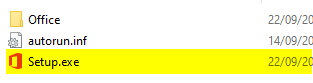
3. On the left side of this same window, you will see that an Office device appears under This Pc. To install, click on the new device/drive, and then on the right side of the window you will see the content. Finally, double-click on the Setup file. This will start the installation process.