


Office 2021 Professional Plus Phone Activation is a genuine retail key for one Windows PC that activates by phone or with the Bcdkey Confirmation ID tool, ideal for offline PCs.


Instant Digital Download

Lifetime Product Guarantee

Year Round Service

Microsoft Certified Partner
Office 2021 Professional Plus Phone Activation is a genuine retail key for Office Professional Plus 2021 that activates by phone rather than instantly online. It covers one Windows PC and installs the complete Professional Plus suite.
Phone activation sounds old-fashioned, but it simply means you exchange a pair of codes to confirm the license. It is especially useful on offline computers, restricted networks, or PCs where online activation is blocked by policy.
Keep one date in mind: Microsoft ends support for Office 2021 on October 13, 2026. This page explains how phone activation works, what you need before you start, and when another Office license is a better fit, with practical checks along the way.
Office 2021 Professional Plus Phone Activation: Quick Answer
Here is what the Office 2021 Professional Plus Phone Activation key includes:
- Edition: Office Professional Plus 2021 for Windows
- Devices: one Windows PC
- License type: perpetual, one-time purchase
- Activation: by phone, using an Installation ID and Confirmation ID
- Delivery: key sent by email, usually instantly
- Platform: Windows 10 and Windows 11 (not macOS)
- Support status: security updates end on October 13, 2026
In simple terms: Install → Enter Key → Choose Phone → Copy Installation ID → Get Confirmation ID → Enter → Activated.
How Does Office 2021 Professional Plus Phone Activation Work?
Phone activation is Microsoft’s alternative to activating over the internet. Office generates an Installation ID, a long number built from your key and your PC. Microsoft’s activation system returns a matching Confirmation ID, which you type back into Office.
Despite the name, you do not always need to make a phone call. The Bcdkey Get Confirmation ID tool lets you paste the Installation ID and receive the Confirmation ID in your browser.
The result is exactly the same as online activation. The apps, features and license rights do not change; only the route to “Product Activated” does.
| Term | What it means |
|---|---|
| Product key | The 25-character key you receive by email |
| Installation ID | A long code Office creates for your key and PC |
| Confirmation ID | The reply code that completes activation |
| Activation wizard | The Office window where you choose phone activation |
Is Office 2021 Professional Plus Still Supported?
Yes, until October 13, 2026. After that date, Microsoft stops releasing security updates, bug fixes and technical support for Office 2021, and it will not offer Extended Security Updates.
Office continues to run after end of support. For an offline PC, the security risk is lower than for a machine that browses the web and opens email attachments all day, but it is not zero.
IMPORTANT: For a PC you expect to use for several more years, consider Office 2024, which Microsoft supports until October 2029. Microsoft’s Office end-of-support resources page lists the current dates. A phone-activated option also exists for the newer release: Office 2024 Pro Plus LTSC Phone Activation Key.
Apps Included With Office 2021 Professional Plus Phone Activation
The key activates the full Professional Plus suite:
| App | What it does |
|---|---|
| Word 2021 | Documents and long reports |
| Excel 2021 | Spreadsheets and data analysis |
| PowerPoint 2021 | Presentations and recordings |
| Outlook 2021 | Email, calendar and contacts |
| OneNote | Notes and notebooks |
| Access 2021 | Desktop databases |
| Publisher 2021 | Print layouts and newsletters |
| Microsoft Teams | Chat and meetings (online only) |
On a fully offline PC, Teams and co-authoring will not be useful, but the desktop apps work normally. Microsoft has also announced Publisher’s retirement in October 2026; Publisher 2021 keeps working after installation.
Office 2021 Features at a Glance
Office 2021 improves the familiar apps rather than reinventing them. The most practical additions are:
Excel
XLOOKUP, XMATCH and LET simplify lookups and long formulas, while dynamic arrays such as FILTER, SORT and UNIQUE return full result ranges from a single formula. These work entirely offline.
Word and PowerPoint
Word gains Line Focus for easier reading and dark mode for the page. PowerPoint records presenter video, ink and laser pointer movements, and adds sketched style outlines.
Outlook
Outlook 2021 includes built-in message translation and a search box at the top of the window. Translation requires an internet connection.
File Compatibility
Support for OpenDocument Format 1.3 helps when you exchange files with other office suites. Office 2021 does not include Copilot, and it does not receive new features after release.
Office 2021 Professional Plus Phone Activation System Requirements
Your PC should meet Microsoft’s published minimums:
| Component | Minimum requirement |
|---|---|
| Operating system | Windows 11 or Windows 10 |
| Processor | 1.1 GHz or faster, 2 cores |
| Memory | 4 GB RAM (64-bit) |
| Storage | 4 GB free disk space |
| Display | 1280 x 768 resolution |
| Graphics | DirectX 9 or later, WDDM 2.0 or higher |
These are minimums rather than a guarantee of smooth performance. The Office 2021 Professional Plus Phone Activation key does not work on macOS; Mac users should look at Office 2021 Home and Business for Mac.
How to Complete Office 2021 Professional Plus Phone Activation
Before you start, make sure you have:
- The 25-character key from your order email
- Office Professional Plus 2021 installed from an official Microsoft source
- A device with internet access to reach the Confirmation ID tool
Then follow these steps:
- Uninstall any older or trial Office version and restart the PC.
- Install Office Professional Plus 2021 using the official installer in your order email, or Microsoft’s Office Deployment Tool.
- Open Word, then go to File → Account → Change Product Key and enter your key.
- When the activation wizard opens, select “I want to activate the software by telephone”.
- Choose your country or region and copy the Installation ID shown on screen.
- Paste the Installation ID into the Bcdkey Get Confirmation ID tool, or call the number Office displays.
- Type the Confirmation ID into the boxes in the wizard and select Next.
- Check File → Account and confirm it shows “Product Activated”.
Typing a long Installation ID is not anyone’s favorite hobby, so copy and paste it wherever you can, and double-check each block. Our full guide on how to activate Microsoft Office by phone includes screenshots of each screen.
Avoid pre-activated or modified Office installers from unofficial websites. They often carry malware and can break activation entirely.
Common Office 2021 Professional Plus Phone Activation Problems
The Confirmation ID Is Rejected
Check that the Installation ID was copied exactly, then generate a fresh Confirmation ID. A single mistyped digit is the usual cause.
The Phone Option Does Not Appear
Office normally shows it after online activation fails or the key requires it. Disconnect from the internet and reopen Word to bring up the activation wizard.
Activation Still Fails
If the steps above do not work, open a Bcdkey support ticket with your order number and a screenshot of the error.
Who Should Choose Office 2021 Professional Plus Phone Activation?
Choose this key when you:
- Use a PC that is offline or on a restricted network
- Are comfortable completing a short code exchange
- Need Access and Publisher on one Windows PC
- Prefer a one-time license and simple budgeting
Pick a different option when you:
- Want activation to finish in one step; choose Office 2021 Professional Plus with online activation
- Need Office on more than one PC
- Want security updates beyond October 2026
FAQ About Office 2021 Professional Plus Phone Activation
Do I have to call Microsoft to activate Office 2021 by phone?
No. You can use the Bcdkey Get Confirmation ID tool to turn your Installation ID into a Confirmation ID without making a call.
Is a phone-activated Office 2021 key genuine?
Yes. Phone activation is an official Microsoft activation method, and the activated Office is the same as with online activation.
Does the PC need internet access for phone activation?
No. The Office PC can stay offline; you only need another device to get the Confirmation ID.
How many PCs can I activate with this key?
One. The Office 2021 Professional Plus Phone Activation key covers a single Windows PC.
Will Office 2021 keep working after support ends?
Yes. After October 13, 2026, Office 2021 keeps running, but Microsoft no longer provides security updates or support.
Can I reinstall Office and activate by phone again?
Normally, yes, on the same PC. Repeat the phone activation steps, and contact Bcdkey support if the Confirmation ID is not accepted.
Final Thoughts
Office 2021 Professional Plus Phone Activation is not a lesser version of Office. It is the same suite with a different, very dependable activation route.
If you need full Office 2021 on one offline or restricted Windows PC, and the October 13, 2026 support date suits your plans, this key is a practical choice. For newer software, compare the Office 2024 range, or browse every Office 2021 license on Bcdkey.
| Brand | Microsoft |
|---|---|
| Operating System | Windows |
| Activation Limit | For 1 PC |
| Activation Type | Phone |
| Delivery Type | Via Email |
| Delivery Time | Instant |
To activate via Telephone
The product key can only be used on one device. It will NOT be tied to your Microsoft account. If you require to reinstall or change your system, you MUST purchase a new key.
1. To download and install Office, go to the official Microsoft download link.
2. After you have completed the download, install Office and enter the 25-digit product key, which you will find in your Dashboard, then proceed to My Orders.
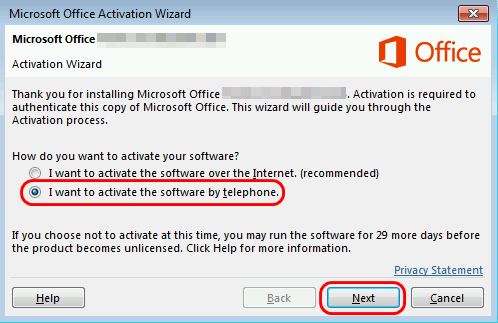
3. Once you have completed the installation, you will be prompted to activate your key to authenticate the license. This version of Office Professional Plus 2021 cannot be activated online and must be activated via telephone.
4. Choose the I want to activate the software by telephone option to make use of Microsoft office telephone activation.
5. Select your county/region from the dropdown menu, and call the toll-free number provided.
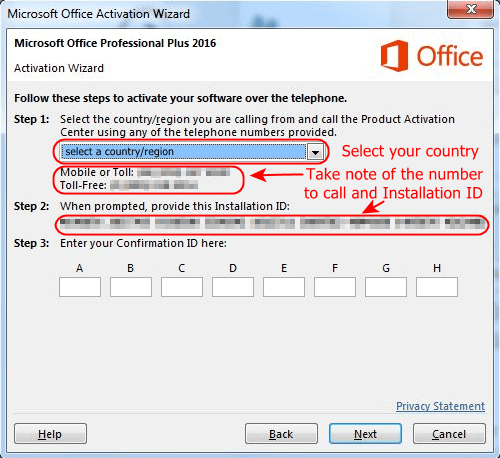
If you see a notice that 'Telephone activation is no longer supported for your product' you can ignore this.
You may still complete the phone activation by calling the Microsoft Office Licensing Activation Centers in your country.
See your country and telephone number/s to call here.
6. When you call the Activation Center via phone or once you're on getcid.info, you'll be asked to type the Installation ID (displayed on your Activation wizard screen).

7. You will then be provided with a Confirmation ID*. In the Activation Wizard on, type the Confirmation ID in the spaces provided at the bottom of the screen, press Next and then Finish.
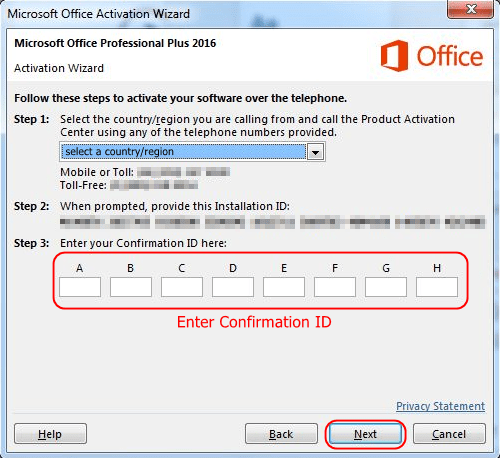
Congratulations! Your Office is now activated and you may enjoy its new features!
*Alternative: If you didn't receive any confirmation ID or cannot call the number, please go to getcid.info and follow this tutorial video on how to get Confirmation ID. NOTE: An API token is required for the system to process Get Confirmation requests. Click here for more information.


