


Instant Digital Download

Lifetime Product Guarantee

Year Round Service

Microsoft Certified Partner
Buy a genuine Windows 10 Professional key and unlock the full business edition of Windows 10 on one PC. It is a one-time purchase, delivered instantly by email, and activates online in minutes, adding BitLocker encryption, Remote Desktop, Hyper-V and domain join to the familiar Windows 10 desktop.
Windows 10 Professional is the edition most freelancers, small businesses and IT-minded users choose. It runs the same apps and games as Home but gives you more control over security, updates and remote access. This page explains what the Windows 10 Professional key includes, how it compares with Home, and how to install and activate it.
Windows 10 Professional Key: Quick Answer
Here is what you get with this license:
- Edition: Windows 10 Professional, 32-bit or 64-bit
- License: one-time purchase, for 1 PC
- Activation: online, as a digital license
- Business features: BitLocker, Remote Desktop host, Hyper-V, Group Policy
- Upgrade: turns Windows 10 Home into Pro without reinstalling
- Windows 11: can typically activate Windows 11 Pro on eligible hardware
- Delivery: key sent by email, typically instantly
In short, Windows 10 Professional is the edition to buy when your PC handles work, client data or remote access.
Why Buy a Windows 10 Professional Key?
Windows 10 Home is fine for browsing and entertainment, but work brings different needs: encrypted drives, remote access, virtual machines and control over when updates install. Windows 10 Professional covers all of those.
Popular reasons to buy include:
- Encrypting a work laptop with BitLocker
- Connecting to the office PC from home with Remote Desktop
- Running virtual machines for development or testing with Hyper-V
- Joining a company domain or Azure Active Directory
- Upgrading an existing Windows 10 Home PC to Pro without a reinstall
- Keeping a business PC that cannot meet Windows 11 requirements fully licensed
Because Windows 10 Professional is a one-time purchase, it is also a predictable cost for small offices that do not want another subscription.
Windows 10 Professional Key at a Glance
| Item | Details |
|---|---|
| Product | Microsoft Windows 10 Professional |
| Number of PCs | 1 |
| Architecture | 32-bit or 64-bit |
| Activation | Online digital license |
| Upgrade from Home | Yes, in place |
| Windows 11 Pro | Can typically activate on eligible hardware |
| Delivery | Digital key by email |
| Download | Free from Microsoft |
Windows 10 Pro Features That Matter for Work
Windows 10 Pro includes everything in Home, plus tools for professionals, small businesses and power users:
- BitLocker encrypts internal drives and USB sticks, protecting data if a laptop is lost or stolen
- Remote Desktop host lets you connect to the PC from another computer, tablet or phone
- Hyper-V runs full virtual machines for testing, development or older software
- Windows Sandbox opens a disposable desktop for trying unknown files safely
- Domain join, Azure AD join and Group Policy connect the PC to company networks and central management
- Windows Update for Business lets you delay and schedule updates
- Assigned Access locks a PC to a single app for kiosks and shared devices
Hyper-V and Windows Sandbox need a 64-bit processor with virtualization support enabled in the BIOS or UEFI settings. If you rely on any of these features, the Windows 10 Professional key is the license to choose rather than a Home key.
Windows 10 Professional vs Windows 10 Home
Both editions share the same Start menu, apps, games and Windows Security. Windows 10 Professional adds the tools below:
| Feature | Windows 10 Home | Windows 10 Pro |
|---|---|---|
| Start menu, Microsoft Edge, Windows Security | Yes | Yes |
| Windows Hello and device encryption (supported hardware) | Yes | Yes |
| BitLocker drive encryption | No | Yes |
| Remote Desktop host | No | Yes |
| Hyper-V and Windows Sandbox | No | Yes |
| Domain join and Group Policy | No | Yes |
| Windows Update for Business | No | Yes |
| Maximum RAM | 128 GB | 2 TB |
Choose Windows 10 Professional if you need any feature marked No under Home. Choose Home only for personal use with no encryption, remote access or domain requirements; our Windows 10 Home Retail Key covers that case.
Already running Home? You do not need to reinstall. Entering a Windows 10 Professional key upgrades the edition in place, usually in under ten minutes.
Retail, OEM and Phone Activation Keys Explained
Windows 10 keys are sold in several license types. They install the same Windows, but the rules around activation and transfer differ:
| License type | How it activates | Transfer to a new PC | Best fit |
|---|---|---|---|
| Retail | Online | Usually yes, after removing it from the old PC | Users who may upgrade or replace their PC |
| OEM | Online | No, it stays with the first PC it activates | New builds and one-time installs |
| Phone activation | By phone or Confirmation ID | Not guaranteed | Budget installs on a single PC |
| Multi-PC (5PC) | Online, one key for several PCs | Within the activation limit | Small offices and families |
All types give you the same features for the edition you buy. The choice is mainly about flexibility: retail keys are easier to move, while OEM and phone activation keys cost less but are meant to stay on one machine.
Who Should Buy Windows 10 Professional?
A Windows 10 Professional key is the right choice when you:
- Work with client files that should be encrypted
- Need to reach the PC remotely with Remote Desktop
- Develop or test software in virtual machines
- Connect to a company domain, Azure AD or Group Policy
- Run a small business with several Windows 10 PCs
- Have hardware that does not meet Windows 11 requirements
Comparing license types? The Windows 10 Professional OEM Key costs less for a PC you will keep, and the Windows 10 Pro 5PC license covers five computers with one key. For new hardware, see Windows 11 Pro.
Windows 10 Professional key System Requirements
Microsoft lists the same minimum hardware for every Windows 10 edition:
| Component | 32-bit | 64-bit |
|---|---|---|
| Processor | 1 GHz or faster | 1 GHz or faster |
| Memory | 1 GB RAM | 2 GB RAM |
| Storage | 16 GB free space | 32 GB free space |
| Graphics | DirectX 9 with WDDM 1.0 driver | DirectX 9 with WDDM 1.0 driver |
| Display | 800 x 600 | 800 x 600 |
These are minimum specifications, not a promise of smooth performance. For comfortable everyday use, plan on at least 8 GB of RAM and an SSD. Most PCs built in the last decade meet these requirements easily, which is why Windows 10 remains a practical choice for hardware that cannot run Windows 11.
How to Install Windows 10 and Activate Your Windows 10 Professional key
Download Windows 10 only from Microsoft. The official Windows 10 download page provides the Media Creation Tool, which builds a bootable USB drive or ISO file containing the main editions.
- Back up your files to an external drive or cloud storage.
- Run the Media Creation Tool and create a USB drive of at least 8 GB.
- Boot the PC from the USB drive and choose Custom install for a clean installation.
- Enter your Bcdkey product key when asked, or select “I don’t have a product key” and add it later.
- Choose Windows 10 Pro if setup asks for an edition, because a Windows 10 Professional key only activates that edition, then complete the installation.
- Open Settings > Update & Security > Activation and confirm that Windows 10 Professional is activated with a digital license.
- Run Windows Update to install the latest drivers and security fixes.
Already running Windows 10? Go to Settings > Update & Security > Activation > Change product key and enter your new key. On Windows 10 Home, this upgrades the PC to Windows 10 Professional in place, keeping your files and apps.
Avoid pre-activated ISOs, “activator” tools and modified downloads. They are a common source of malware and can block activation with a genuine key.
Can You Use This Key to Activate Windows 11?
In most cases, yes. Microsoft accepts Windows 10 Pro product keys for the matching edition of Windows 11, so a Windows 10 Professional key can typically activate Windows 11 Pro as well. That gives you a clear path forward once your hardware is ready.
Windows 11 has stricter hardware requirements than Windows 10:
- A supported 64-bit processor, generally Intel 8th generation or AMD Ryzen 2000 series and newer
- TPM 2.0 (Trusted Platform Module, a security chip) enabled in the firmware
- UEFI firmware with Secure Boot capability
- At least 4 GB of RAM and 64 GB of storage
Run Microsoft’s PC Health Check app to see whether your computer qualifies. If it does not, Windows 10 remains the practical option for that machine. Buying for newer hardware? Browse our Windows 11 range or read our Windows 11 Home vs Pro guide.
Tips for a Smooth Windows 10 Professional key Setup
A few minutes of preparation makes installation and activation much easier:
- Sign in with a Microsoft account after setup, so your digital license is linked to it
- Download chipset, graphics and Wi-Fi drivers from your PC maker before you start, especially on older laptops
- Choose the 64-bit version unless the PC has less than 4 GB of RAM or a very old processor
- Keep Windows Security and the built-in firewall turned on
- Create a system restore point once everything is working
Installing drivers before you need them saves the classic headache of a fresh install with no network connection to download them.
Does Windows 10 Still Receive Updates?
Windows 10 has reached the end of Microsoft’s regular support, and version 22H2 is its final feature update. Your installation keeps working, and activation with a genuine key continues to function as normal.
Microsoft offers an Extended Security Updates (ESU) program that provides additional security patches for a limited period. Outside that program, new vulnerabilities are not patched, so the risk grows the longer a PC stays on Windows 10.
Windows 10 is therefore best suited to:
- PCs that cannot meet Windows 11 hardware requirements
- Software or devices certified only for Windows 10
- Test benches, virtual machines and offline systems
- A short-term setup while you plan a move to Windows 11
Microsoft’s Windows 10 lifecycle page lists the official support details.
Delivery, Order Tracking and Support
Your key is sent by email, typically instantly after payment, and is also saved in My Account. You can follow any order with Track Order.
If activation does not complete, open a support ticket with a screenshot of the error message and our team will help. Answers to common questions are in our FAQs, and every edition is listed in our Windows 10 category.
Buying for several PCs or for an organization? The Bcdkey B2B wholesale program is designed for business and volume orders.
Using Windows 10 Professional in a Small Business
Windows 10 Professional gives a small office most of the control larger companies rely on, without a server or a dedicated IT team. A few settings make a big difference:
- Turn on BitLocker for every laptop and store the recovery keys in a safe place
- Use Windows Update for Business to delay feature changes until you have tested them
- Enable Remote Desktop only for named users, and use strong passwords or a VPN
- Create standard user accounts for staff and keep administrator access separate
- Use Group Policy to apply the same security settings across several PCs
These steps cost nothing beyond the Windows 10 Professional license itself and noticeably reduce the risk of data loss. If you are licensing several computers, ask about volume pricing through our B2B program.
FAQ About Windows 10 Professional Key
Is this a genuine Windows 10 Professional key?
Yes. It is a genuine Microsoft product key that activates Windows 10 Professional on one PC.
Can I upgrade Windows 10 Home to Windows 10 Professional with this key?
Yes. Enter the key under Settings > Update & Security > Activation > Change product key and Windows upgrades in place without deleting files.
Does Windows 10 Professional include BitLocker?
Yes. BitLocker, Remote Desktop host, Hyper-V and Group Policy are all included in Windows 10 Professional.
Does the key work for 32-bit and 64-bit?
Yes. It activates either version; choose 64-bit for Hyper-V and most modern PCs.
Can I use this key to activate Windows 11 Pro?
In most cases, yes, on hardware that meets Windows 11 requirements.
Is Windows 10 Pro the same as Windows 10 Professional?
Yes. Windows 10 Pro is simply the short name for Windows 10 Professional.
Does it include Microsoft Office?
No. Office is licensed separately; see our Microsoft Office range.
How fast is delivery?
Keys are delivered by email, typically instantly after your order is confirmed.
| Brand | Microsoft |
|---|---|
| Operating System | Windows |
| Activation Limit | For 1 PC |
| Activation Type | Online |
| Delivery Type | Via Email |
| Delivery Time | Instant |
This Windows version can be ONLY used for 1-time installation on 1 PC only and is NOT transferable. It can be also used to upgrade lower versions of Windows to Windows 10 Professional.
Download Link: https://www.microsoft.com/en-us/software-download/windows10
Before upgrading to Windows 10 Pro, make sure your device is up to date and running the most recent version of Windows 10 Home. For more info about how to keep your PC updated, see Windows Update: FAQ.
1. Press the Windows key/logo, go to Settings > Update and Security > Activation.
2. Click the Change product key.
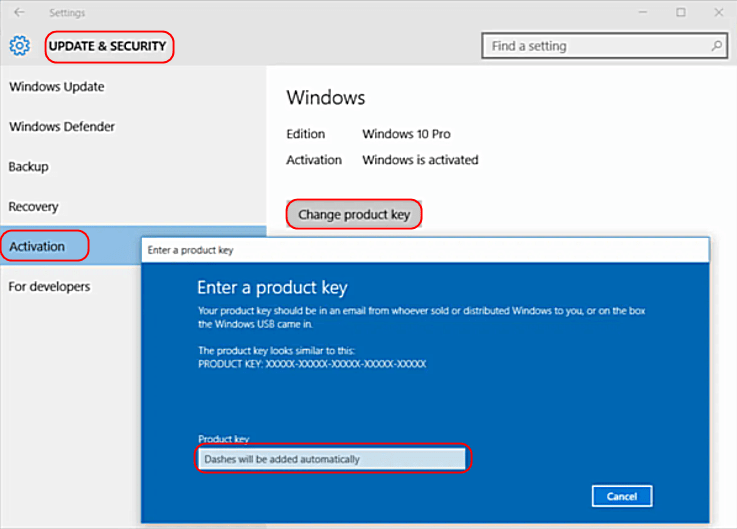
3. Enter your product key, then click the Next button.
4. Click Activate.
If you encounter any errors during the activation process, check this troubleshooter.


