


Instant Digital Download

Lifetime Product Guarantee

Year Round Service

Microsoft Certified Partner
Buy a genuine Windows 8.1 Pro retail key to activate Windows 8.1 Professional on one PC. It is a one-time purchase, delivered by email, and unlocks the business features of Windows 8.1, including BitLocker encryption, domain join, Remote Desktop host and Hyper-V.
Windows 8.1 is no longer supported by Microsoft and does not receive security updates, so this key suits specific needs: reinstalling an existing Windows 8.1 PC, running software certified for Windows 8.1, or keeping a legacy or offline machine in service. For an everyday internet-connected PC, Windows 11 Pro is the better choice.
Windows 8.1 Pro Key: Quick Answer
Here is what you get with this license:
- Edition: Windows 8.1 Pro (32-bit or 64-bit)
- License: retail, one-time purchase, for 1 PC
- Activation: online, with phone activation as a fallback
- Delivery: key sent by email, typically instantly
- Installation media: not included
- Updates: no longer supported by Microsoft
- Best for: legacy business software, older hardware and offline PCs
Choose this key when something specific depends on this edition. For a secure modern PC, choose Windows 11 instead.
Why Buy a Windows 8.1 Pro Key?
Most buyers are not setting up a brand-new computer with it. They need it because a device, program or workflow was built around it.
Common reasons include:
- Reinstalling Windows 8.1 on a PC whose original Pro key is lost
- Running business, lab or machine-control software certified for Windows 8.1
- Keeping older hardware working when it lacks Windows 10 or 11 drivers
- Using Hyper-V or Remote Desktop on a dedicated legacy machine
- Building a test or virtual machine that mirrors an older environment
A genuine key removes activation warnings and the personalization limits of an unactivated installation.
Windows 8.1 Pro Key at a Glance
| Item | Details |
|---|---|
| Product | Microsoft Windows 8.1 Pro |
| License type | Retail |
| Number of PCs | 1 |
| Architecture | 32-bit or 64-bit |
| Activation | Online; phone activation as a fallback |
| Delivery | Digital key by email |
| Installation media | Not included |
| Security updates | No longer provided by Microsoft |
Windows 8.1 Pro Features
The Pro edition includes everything in standard Windows 8.1, plus tools aimed at business and power users:
- BitLocker and BitLocker To Go to encrypt drives and USB sticks
- Domain join and Group Policy for managed networks
- Remote Desktop host, so you can connect to the PC from another device
- Client Hyper-V for running virtual machines on 64-bit systems
- Encrypting File System for individual files and folders
- Boot from a virtual hard disk (VHD)
- The Start button and the option to boot straight to the desktop
Windows 8.1 also introduced improved search, snap views for running apps side by side, and better support for high-resolution displays.
Windows 8.1 Pro vs Windows 8.1
The key must match the edition you install. Here is how the two main editions differ:
| Feature | Windows 8.1 | Windows 8.1 Pro |
|---|---|---|
| Start screen, Start button, desktop | Yes | Yes |
| BitLocker drive encryption | No | Yes |
| Join a Windows domain | No | Yes |
| Remote Desktop host | No | Yes |
| Client Hyper-V | No | Yes |
| Group Policy | No | Yes |
| Maximum RAM (64-bit) | 128 GB | 512 GB |
If the PC only needs basic desktop use, the standard edition is enough. For encryption, virtualization or a business network, the Pro edition is the one to buy.
Windows 8.1 Pro System Requirements
Microsoft’s published minimum requirements are:
| Component | 32-bit | 64-bit |
|---|---|---|
| Processor | 1 GHz or faster with PAE, NX and SSE2 | 1 GHz or faster with PAE, NX and SSE2 |
| Memory | 1 GB RAM | 2 GB RAM |
| Storage | 16 GB free space | 20 GB free space |
| Graphics | DirectX 9 with WDDM driver | DirectX 9 with WDDM driver |
Client Hyper-V additionally needs a 64-bit processor with Second Level Address Translation (SLAT) and at least 4 GB of RAM. On recent PCs, missing drivers are a more common obstacle than speed.
How to Install and Activate Windows 8.1 Pro
You need installation media for the same edition as this key. Use official or original media you trust.
- Back up your files before installing.
- Boot from your Windows 8.1 DVD or USB drive.
- Choose Custom install, select the target drive and complete setup.
- Enter your Bcdkey product key when prompted.
- Connect to the internet; Windows activates automatically, or open PC settings > PC and devices > PC info and select Activate.
- If online activation fails, run
slui 4to choose phone activation. - Install the drivers your hardware needs.
Avoid pre-activated or modified ISOs. They often contain malware and can block activation with a genuine key.
If phone activation shows an Installation ID, the Bcdkey Get Confirmation ID tool can help you finish. Microsoft’s Windows 8.1 lifecycle page lists the official support details.
How to Use Windows 8.1 More Safely
Because Windows 8.1 no longer receives security updates, a few precautions help:
- Keep the PC offline or on an isolated network where possible
- Turn on BitLocker for drives with sensitive data
- Avoid email, online banking and general browsing on the machine
- Install only the software the PC actually needs
- Back up important files to another device regularly
Used as a dedicated tool rather than an everyday computer, a Windows 8.1 PC can keep running the software it was set up for, with far less exposure to online threats.
Windows 8.1 Pro vs Windows 10 Pro and Windows 11 Pro
If you are not tied to Windows 8.1, a newer Pro edition is usually the better buy:
| Need | Windows 8.1 Pro | Windows 11 Pro |
|---|---|---|
| Security updates | No | Yes |
| BitLocker, domain join, Hyper-V | Yes | Yes |
| Legacy software and drivers | Strong | Varies |
| Modern hardware and apps | Limited | Yes |
| Best use | Legacy and offline PCs | Everyday business use |
Compare options in our Windows 11 and Windows 10 ranges, or read our Windows 11 Home vs Pro guide.
Delivery, Order Tracking and Support
Your key is delivered by email, typically instantly, and saved in My Account. You can follow any order with Track Order.
If activation does not complete, open a support ticket with a screenshot of the message. More answers are in our FAQs, and this edition is listed in our Windows 8.1 category.
FAQ About Windows 8.1 Pro Retail Key
Is this a genuine Windows 8.1 Pro key?
Yes. It is a retail product key that activates Windows 8.1 Pro on one PC.
Does the key work for 32-bit and 64-bit?
Yes. It activates either version; install the one that suits your hardware.
Is a download link included?
No. You need your own Windows 8.1 installation media for the Pro edition. Keep the original disc or USB drive in a safe place for future reinstalls.
Can I activate standard Windows 8.1 with this key?
No. This key activates the Pro edition only, so install Pro to use it.
Does Windows 8.1 Pro include BitLocker?
Yes. BitLocker, domain join, Remote Desktop host and Hyper-V are all included in the Pro edition, but not in standard Windows 8.1.
Does Windows 8.1 still receive security updates?
No. Microsoft no longer provides security updates, so it is best used offline or for specific legacy tasks.
What if online activation fails?
Run slui 4 for phone activation, or use the Bcdkey Get Confirmation ID tool with your Installation ID.
How fast is delivery?
Keys are delivered by email, typically instantly after your order is confirmed.
| Brand | Microsoft |
|---|---|
| Operating System | Windows |
| Activation Type | Online |
| Activation Limit | For 1 PC |
| Delivery Time | Instant |
| Delivery Type | Via Email |
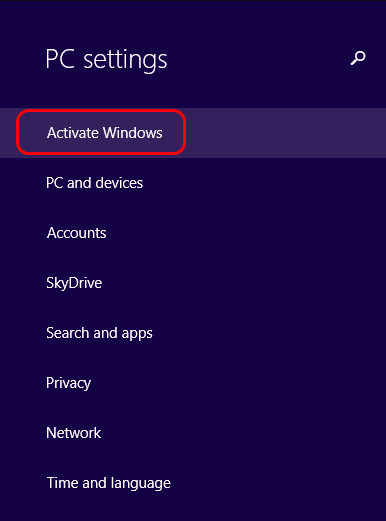
1. Select the Start button, type PC settings, and then select PC settings from the list of results.
2. Choose Activate Windows.
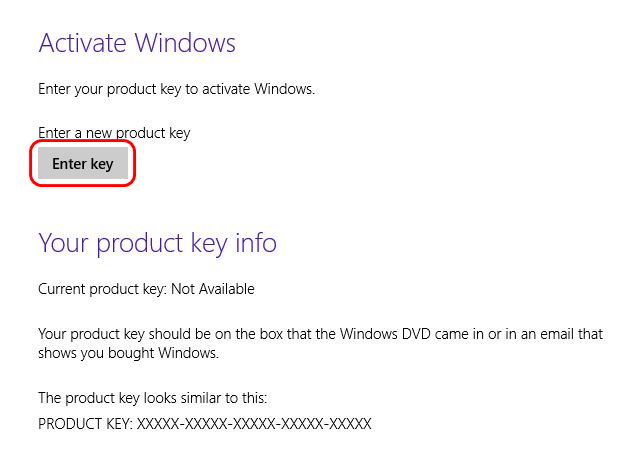
3. On the Activate Windows screen, click Enter key.
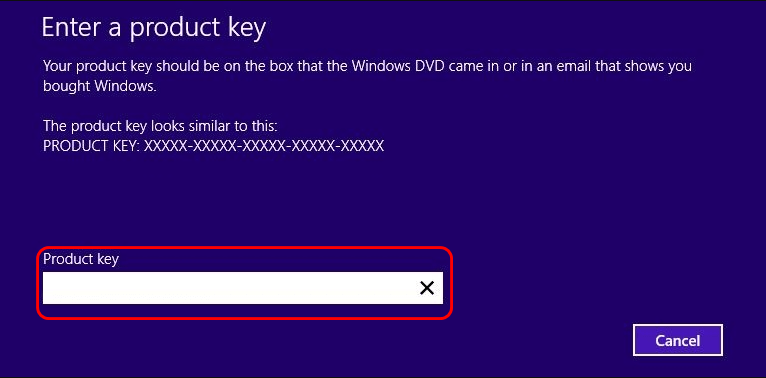
4. Enter your Windows 8.1 product key, select Next. At this point, just follow the on-screen instructions to activate Windows 8.1.
Note: In case you need a Windows 8 ISO, please proceed to this link.


