


Instant Digital Download

Lifetime Product Guarantee

Year Round Service

Microsoft Certified Partner
Get a Windows 7 Pro (Windows 7 Professional) retail key for one PC, delivered instantly by email. This 25-character product key installs and activates Windows 7 Professional in 32-bit or 64-bit, ideal for older PCs, business machines running legacy software, and virtual machines.
What You Get with This Windows 7 Pro Key
- Edition: Windows 7 Professional (32-bit and 64-bit)
- License type: Retail product key, one-time purchase
- Activation limit: 1 PC
- Activation type: Online
- Delivery: Instant, via email and your account order page
- Support: Activation help through our support desk
Windows 7 Professional Features
| Feature | What it gives you |
|---|---|
| Domain join | Connect to a Windows Server domain and manage the PC with Group Policy |
| Remote Desktop host | Connect to this PC remotely from another computer |
| Windows XP Mode | Run older XP-only programs in a virtual XP environment (download required) |
| Encrypting File System (EFS) | Encrypt individual files and folders |
| Backup to network | Back up your PC to a network location or external drive |
| Location-aware printing | Switch default printers automatically between home and office networks |
| Taskbar tools | Jump Lists, Aero Snap, Aero Peek and Shake for faster multitasking |
| Memory support | Up to 192 GB RAM on 64-bit and 2 physical processors |
BitLocker drive encryption is not part of Windows 7 Pro. It’s only in Windows 7 Ultimate and Enterprise.
Who Still Needs Windows 7 Pro?
- Businesses with legacy software that doesn’t run on Windows 10 or 11
- Industrial, lab and medical PCs tied to Windows 7 drivers or control software
- Older PCs that don’t meet Windows 10 or 11 requirements
- Virtual machines for testing, support or software preservation
How to Install and Activate Windows 7 Pro
- Complete your order. Your Windows 7 Pro key arrives by email right after payment. You can also find it in My Account.
- Install Windows 7 Professional from Windows 7 Professional media (DVD, ISO or USB) and choose 32-bit or 64-bit. See our Windows 7 clean installation guide.
- Enter your product key during setup, or later under Start > Control Panel > System > Change product key.
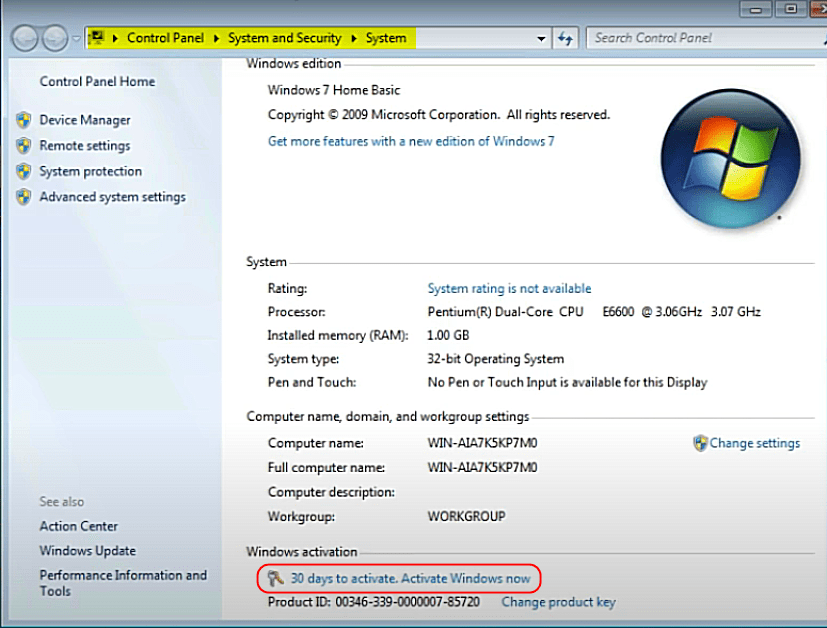
- Activate online by clicking Activate Windows now in the System window.
- If online activation fails, get your Installation ID and use our Get Confirmation ID tool, or contact support.
Important: Use Windows 7 Professional Media
This key activates Windows 7 Professional only. It won’t be accepted by Home Premium, Ultimate, Enterprise or manufacturer (OEM) recovery media. If setup says the key is invalid, mismatched media is the most common cause.
Windows 7 Pro System Requirements
| Component | 32-bit | 64-bit |
|---|---|---|
| Processor | 1 GHz or faster | |
| RAM | 1 GB | 2 GB |
| Free disk space | 16 GB | 20 GB |
| Graphics | DirectX 9 device with WDDM 1.0 or higher driver | |
Newer PCs may lack Windows 7 drivers, especially for USB 3.0, NVMe storage and recent graphics cards. On modern hardware, a virtual machine is often the easiest option.
Windows 7 Pro vs Home Premium vs Ultimate
| Home Premium | Professional | Ultimate | |
|---|---|---|---|
| Domain join and Remote Desktop host | No | Yes | Yes |
| Windows XP Mode and EFS | No | Yes | Yes |
| BitLocker and multi-language packs | No | No | Yes |
| Best for | Home PCs | Business and legacy software | Users who need every feature |
Compare: Windows 7 Home Premium, Windows 7 Ultimate or browse all Windows 7 keys.
Security Notice: Windows 7 Is No Longer Supported
Microsoft ended support for Windows 7 on January 14, 2020, as shown on the Windows 7 lifecycle page, so it no longer gets security updates. Keep the PC offline or isolated where possible, and use it only for the software that needs it. For everyday use, choose Windows 11 Pro or Windows 10 Pro.
Troubleshooting Common Windows 7 Pro Key Problems
- “The product key is invalid”: Make sure you installed Windows 7 Professional, not Home Premium or Ultimate, and check the key for typos.
- Activation errors: See our activation error 0x80072F8F fix (often caused by a wrong date or time), or use the Get Confirmation ID tool.
- Key not received: Check your spam folder, then use Track Order or check My Account.
Frequently Asked Questions
Where can I buy a Windows 7 Pro key?
You can buy a Windows 7 Professional retail key right here at Bcdkey. It is delivered instantly by email and activates Windows 7 Pro on one PC.
Can I still activate Windows 7 Pro in 2026?
Yes. Enter your product key and activate online. If online activation does not complete, use the Get Confirmation ID tool with your Installation ID, or contact our support team.
Does the key work for both 32-bit and 64-bit?
Yes. The same Windows 7 Professional key activates both the 32-bit and 64-bit versions. Choose the version that matches your PC during installation.
Can I upgrade from Windows 7 Pro to Windows 10 or 11 for free?
No. Microsoft ended the free upgrade path, and Windows 7 keys no longer activate Windows 10 or Windows 11. For a newer system, buy a Windows 10 Pro or Windows 11 Pro key.
Does Windows 7 Pro include BitLocker?
No. BitLocker is only included in Windows 7 Ultimate and Enterprise. Windows 7 Professional includes the Encrypting File System (EFS) instead.
Does the key work with Windows 7 Home Premium or Ultimate media?
No. This key only works with Windows 7 Professional installation media. Use the matching edition to avoid an invalid key error.
Is Windows 7 still safe to use?
Windows 7 works and activates normally, but has not received security updates since January 14, 2020. Keep it offline or isolated where possible and use it only for software that needs it.
Buy Windows 7 Pro Today
Get a Windows 7 Professional retail key for 1 PC with a one-time payment, 32-bit and 64-bit support and instant email delivery from bcdkey.net. Questions about refunds? See our refund policy.
| Brand | Microsoft |
|---|---|
| Operating System | Windows |
| Activation Limit | For 1 PC |
| Activation Type | Online |
| Delivery Time | Instant |
| Delivery Type | Via Email |
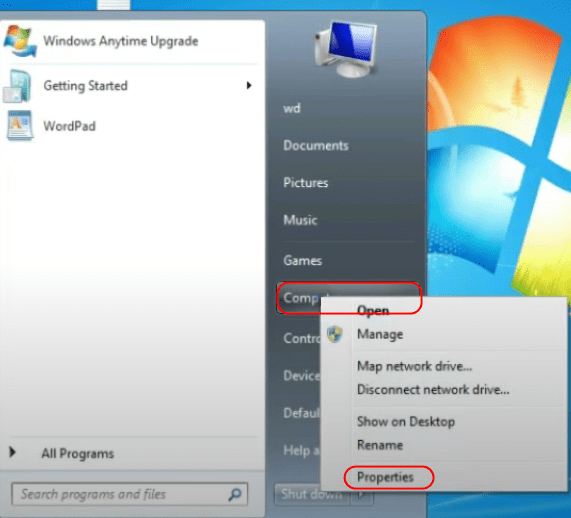
1. Select the Start button, right-click Computer, select Properties, and then select Activate Windows now.
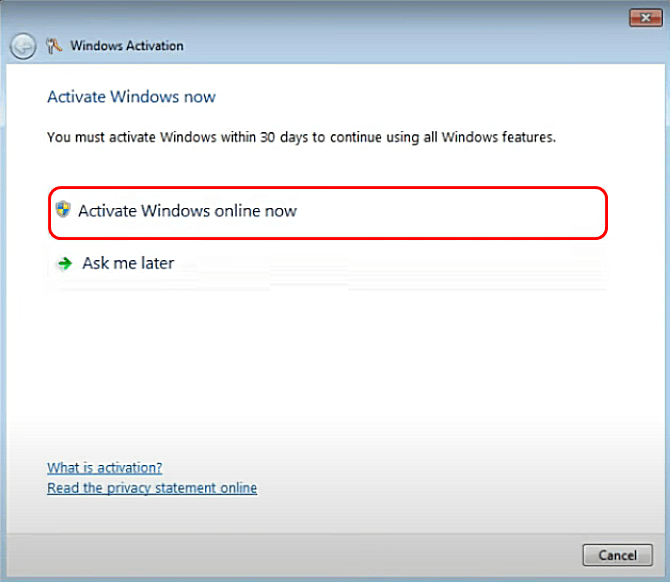
2. If Windows detects an internet connection, select Activate Windows online now. You might be asked for an admin password or to confirm your choice.
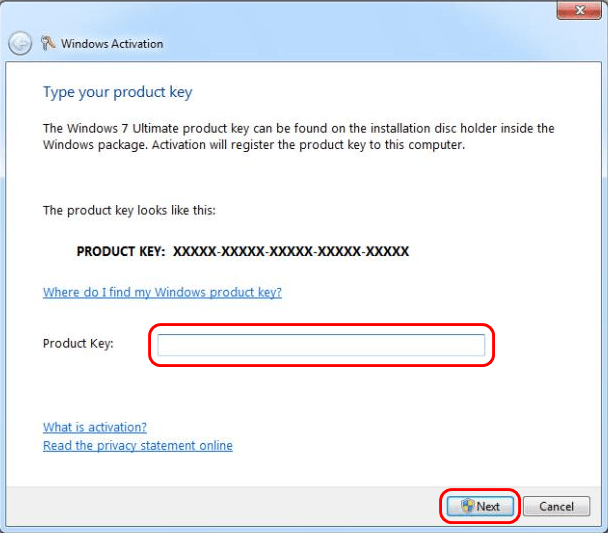
3. Enter your Windows 7 activation key when prompted, select Next. Activation will start. This might take a few minutes.
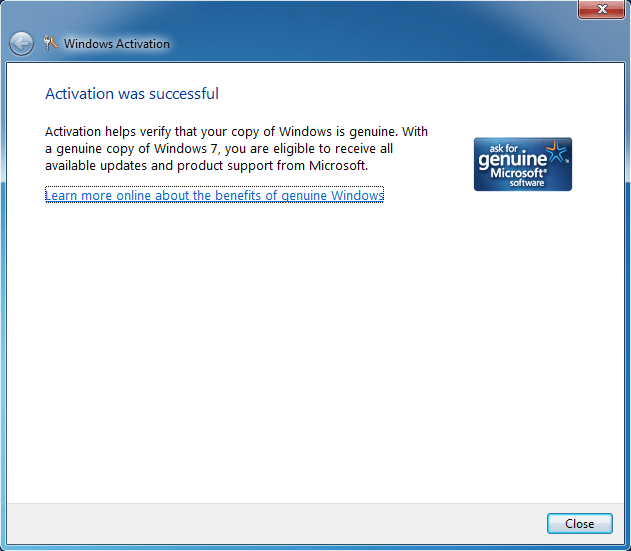
4. Once done, it will say Activation was successful, click Close. At this point, you can go back to Properties and scroll down to Windows activation, it should now say Windows is activated.
Note: In case you need a Windows 7 ISO, please proceed to this link.


